







How Integrators Can Build Scalable Multi-Room AV Systems Using AV over IP
A Practical Guide to Designing for Growth
If you've ever wired up a multi-room AV system with a traditional HDMI matrix, you already know the catch. The day you need one more display, you're staring at a fixed 8x8 box that's completely full. Adding capacity means swapping the whole switcher, and that's a hard conversation to have with a client. So how do you design a system that grows with the building instead of fighting it?
The answer most integrators are landing on is AV over IP. Let's break down why it works and how to build with it.
Why Traditional Matrices Hit a Wall

A traditional matrix switcher has a fixed number of inputs and outputs. An 8x8 routes eight sources to eight displays — no more, no less. It's reliable for a room with a known layout, but the moment the project scope changes, you're boxed in. More sources or more screens means new hardware and often new cabling.
There's a distance problem too. HDMI runs are limited without extenders, so spreading signal across a large facility gets complicated fast.
AV over IP sidesteps both issues by treating video like any other data on the network.
What "AV over IP" Actually Means
AV over IP (sometimes written AVoIP) is exactly what it sounds like: audio and video transmitted as packets over a standard IP network instead of through dedicated AV cabling. Each source connects to an encoder (a transmitter), and each display connects to a decoder (a receiver). A network switch sits in the middle and routes everything.
Think of it like the difference between a building with a fixed number of hard-wired phone lines versus one running on the office network. With the network, adding a new endpoint is just plugging in another device — not re-running cable to a central box.
Because the switch does the routing, your input and output count isn't locked. Need another source? Add an encoder. Another display? Add a decoder. The system grows one device at a time.
How to Build for Scale
Here's the design mindset that makes AVoIP scalable rather than just flexible.
Start with the network, not the AV gear. Your switch is now the backbone of the system, so it needs enough bandwidth and the right configuration — particularly IGMP snooping for handling multicast traffic cleanly. Multicasting is what lets one source reach many displays at once without flooding the network, and it's the heart of point-to-many distribution.
Next, standardize your endpoints. Using a consistent encoder/decoder family across rooms keeps management simple and makes future expansion predictable. When every room speaks the same language, adding the tenth room is no harder than adding the second.
Finally, plan your control layer. A good AVoIP system lets an operator drag and drop any source to any display, build a video wall, or reconfigure a space on the fly — all from a web interface or app. That's the payoff: a system that adapts to how the building is actually used.
A BZBGEAR Solution That Scales
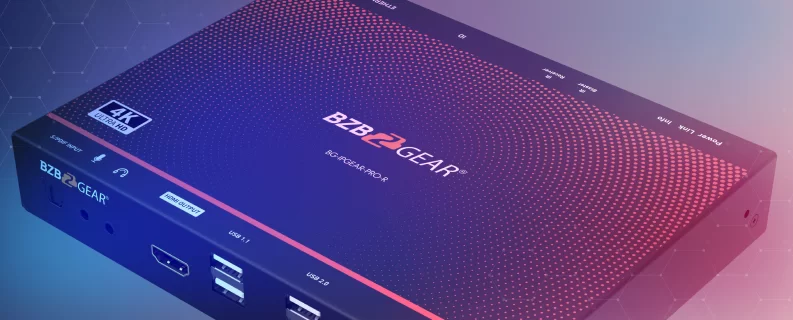
This is where having the right hardware makes the design easy. The BZBGEAR BG-IPGEAR-PRO series is built exactly for this kind of multi-room deployment. It uses separate transmitter (BG-IPGEAR-PRO-T) and receiver (BG-IPGEAR-PRO-R) units, so you add only what each room needs — encoders for sources, decoders for displays — over standard Gigabit Ethernet with Power over Ethernet (PoE) support to simplify cabling. Pair them with a smart controller (BG-IPGEAR-PRO-C), which auto-discovers every device on the network so setup stays simple.
It delivers 4K@60Hz video and supports point-to-point, point-to-many, and multicast distribution, so a single source can feed as many displays as the project calls for. Built-in KVM, bi-directional IR, and RS-232 extension mean you're carrying control signals alongside the video, not running them separately. And because the platform is managed through a web interface or the free BG-Control app — available on Windows, macOS, iOS, and Android — your operator can route sources and build video walls without touching the rack.
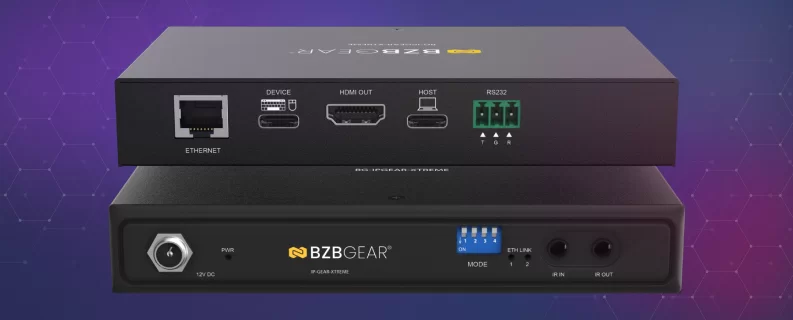
When a project needs more headroom — uncompressed higher frame rates, 8K, or fiber runs — the BG-IPGEAR-XTREME and BG-IPGEAR-ULTRA lines step up while keeping the same scalable, network-based approach. A single BG-IPGEAR-PRO system can manage up to 1,024 units on one smart controller — room to grow for even the largest campus or venue.
The Bottom Line
The real advantage of AV over IP isn't any single feature — it's that the system is never "full." You design for today's room count and let the network carry tomorrow's. For integrators, that means fewer rip-and-replace conversations and more projects that simply expand when the client is ready.
If you're planning a multi-room build and trying to figure out which AVoIP system fits your project, let us know — we're happy to help you spec it out. Explore the full lineup of BZBGEAR AV over IP solutions at BZBGEAR.com.


8.00 a.m. - 5.00 p.m. (PST)
10.00 a.m. - 3.00 p.m. (PST)
(by appointment only)