







When to Choose a Wireless Extender
Wireless vs. Wired Signal Extension: A Practical Decision Guide
There's a moment on almost every install where somebody looks at the ceiling, then at the display, then back at the ceiling, and says the words nobody wants to hear: "So how are we getting the cable over there?"
Sometimes the answer is easy. Drop tile, pull Cat6, done before lunch. Other times you're staring at a 100-year-old plaster wall in a historic chapel, a glass atrium with no conduit path, or a client who just signed a lease that says "no drilling." And that's okay! Those situations are exactly why wireless extenders exist.
But wireless isn't automatically the right call just because pulling cable is a hassle. Choosing correctly comes down to understanding what you're actually trading away. Let's break it down.
What a Wireless Extender Actually Does
A wireless extender is a two-piece kit: a transmitter that takes HDMI in from your source, and a receiver that outputs HDMI to your display. Between them, the video travels over radio spectrum instead of copper. Most Pro AV kits work in the 5GHz Wi-Fi band, which handles interference far better than 2.4GHz and gives you room for real 4K bandwidth.
Here's the part that trips people up: Wi-Fi-band wireless extenders compress the signal. They have to. Uncompressed 4K60 4:4:4 runs well north of 10Gbps — an HDMI 2.0 link is rated for 18 — and there simply isn't that much clean airtime available over Wi-Fi. That compression is what makes the whole thing possible, and it's also the source of every trade-off we're about to talk about.
Think of it like shipping furniture. A truck can carry the couch fully assembled. Air freight is faster to arrange and goes places the truck can't, but the couch has to come apart first — and putting it back together takes a beat.
The Three Questions That Decide It
Before you spec anything, run the job through these three filters.
- Is there a realistic cable path? Not "is it possible" — is it realistic, on budget, and allowed? Conduit runs, asbestos abatement, landlord restrictions, historic preservation rules, and terrazzo floors have all killed more cable pulls than bad planning ever did. If the honest answer is no, wireless moves to the top of the list.
- Does the content care about latency? This is the big one. A typical 4K wireless kit introduces somewhere in the range of 120 to 180 milliseconds of delay — call it a sixth of a second. For digital signage, a menu board, a lobby display, or a sermon playing back to an overflow room, nobody will ever notice. For a live presenter watching a confidence monitor, a surgeon looking at a scope feed, or anything where someone's hand movement has to match what's on screen, that delay is a dealbreaker.
- How long does this need to live? Temporary and semi-permanent installs are wireless's home turf. Trade show booths, ballroom setups, seasonal retail, pop-up studios, and rental gear all benefit enormously from a kit you can pack in a case and redeploy next month. Permanent infrastructure that will run every day for the next decade usually deserves cable.
When Wireless Is the Right Answer
Wireless wins when the physical environment fights back. Historic buildings and houses of worship where you can't touch the walls. Leased corporate space where the landlord says no. Glass-walled conference rooms and atriums with no path above the ceiling. Rental and staging work where the gear moves constantly.
It also wins on speed. A wireless kit goes in over a lunch break. Pulling and terminating a run through an occupied building can take days and a second trade. When the client wants the room working Thursday and it's already Tuesday, that math matters.
And it wins on flexibility. If the display might move — a mobile cart in a hospital, a rolling rack in a classroom, a demo station on a showroom floor — hard-wiring it just creates a future problem.
When You Should Run Cable Instead
Be honest with yourself here, because this is where jobs go sideways.
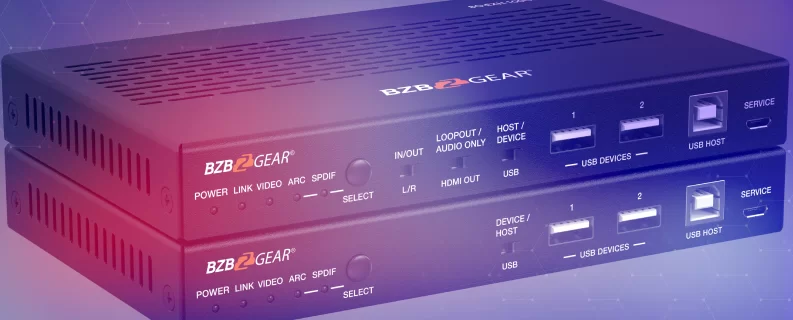
Go wired when latency has to be imperceptible. Live production, esports, medical imaging, courtroom evidence displays, anything with a camera operator or a presenter reacting in real time — these want a wired path. HDBaseT 3.0 moves uncompressed 4K60 4:4:4 up to 328 feet over a single Cat6a cable with effectively zero latency, and it carries IR, RS-232, 1Gb Ethernet, USB, and power along the way. The BG-EXH-100C6 is a good example of what that looks like in a box.
Go wired when the RF environment is hostile. Dense apartment buildings, convention centers, stadiums, hospitals, and corporate campuses with heavy enterprise Wi-Fi all put pressure on the 5GHz band. Wireless will often still work — but "often works" is a rough thing to warranty.
Go wired when there's no line of sight. Published wireless range figures assume a clear path. Every wall, steel stud, elevator shaft, and metal-backed whiteboard between the two units chips away at that number. A kit rated for 164 feet in an open room can fall well short of that once a couple of masonry walls get in the way — so survey the actual space, not the spec sheet.
And go wired — or go AV-over-IP — when you're feeding many displays or need switching. Wireless is fundamentally a point-to-point tool. Once you're distributing to a dozen endpoints, building video walls, or routing sources dynamically, a networked AV-over-IP system is the architecture that actually scales.
BZBGEAR Highlight: Matching the Kit to the Job
Once you've decided wireless is the right call, the spec comes down to how many displays and how much latency you can live with.
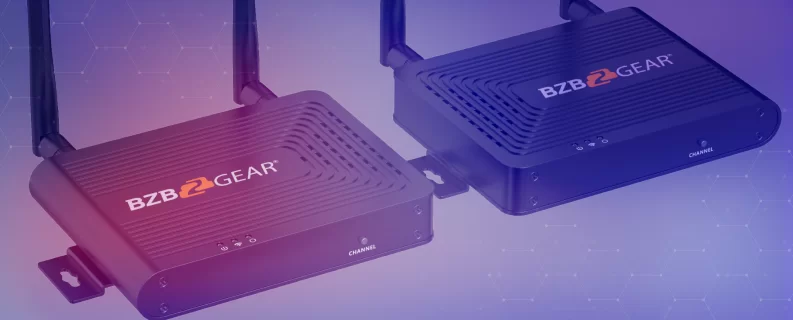
The BG-Air4Kast is the straightforward one-to-one workhorse — 4K60 out to 50 meters (164 feet) on the 5GHz band, with HDCP 2.2, IR pass-back so you can still control the source from the display side, and an HDMI output on the transmitter for a local monitor. Latency lands in the 130–180ms range, which tells you exactly where it belongs: signage, overflow rooms, lobby displays, and any playback-driven content. It's the right fit for a single remote display in a room where cable just isn't happening.
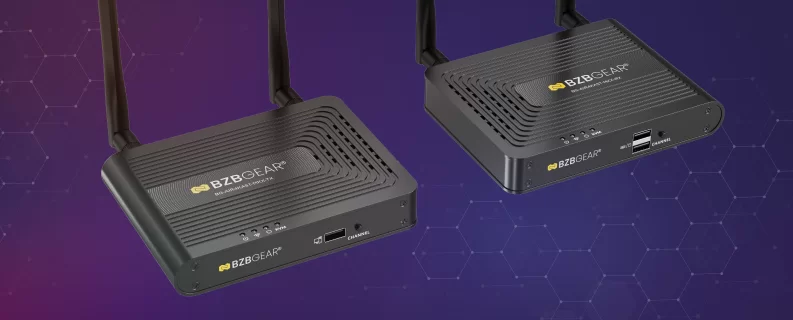
Need to hit more than one screen? The BG-Air4Kast-MKX supports up to four receivers from a single transmitter, which is useful for signage clusters and multi-room overflow. Just plan for the range trade honestly, because it's steep: one-to-one gives you the full 50 meters, but that drops to under 30 meters with two receivers, under 20 with three, and under 15 with four. Place your transmitter accordingly.
One more thing worth knowing: the MKX runs 120–180ms at 4K60, but drops to 70–120ms at 1080p60. If your content doesn't truly need 4K, stepping down the resolution buys back real responsiveness. That's a trade worth making more often than people think.
The Bottom Line
Wireless extension isn't a compromise, and it isn't a shortcut — it's a specific tool for a specific problem. When the building won't let you run cable, when the install is temporary, or when the content doesn't care about a fraction of a second, wireless is the smart, fast, clean answer. When latency, RF congestion, or scale are in play, cable earns its keep.
The best integrators aren't the ones who always pick one or the other. They're the ones who ask the right three questions first.
Not sure which side of the line your project falls on? Reach out — we're happy to walk through the space with you. And to compare your options side by side, browse the full lineup of wireless extenders and HDMI extenders over category cable at BZBGEAR.com.


8.00 a.m. - 5.00 p.m. (PST)
10.00 a.m. - 3.00 p.m. (PST)
(by appointment only)