







Why USB 3.0 Matters in Modern Pro AV and KVM Workflows
USB is one of those technologies most of us stop thinking about the moment a cable clicks into place. It just works. But in Pro AV and KVM installations, the version of USB you're running quietly decides whether your camera streams clean 4K, whether your operator's mouse feels snappy or sluggish, and whether your control room can actually keep up with the workload. And as more of our gear moves to 4K, 8K, and shared-workstation setups, USB 3.0 has gone from a nice-to-have to a baseline expectation.
Let's break it down.
What USB 3.0 Actually Brings to the Table
USB 3.0 — also called USB 3.2 Gen 1 or SuperSpeed USB — moves data at up to 5 Gbps. That's roughly ten times the bandwidth of USB 2.0. It also delivers more power to attached devices and supports full-duplex communication, meaning data can travel in both directions at the same time rather than taking turns.
Think of USB 2.0 as a single-lane road and USB 3.0 as a multi-lane highway with traffic flowing both ways at once. For a thumb drive or a keyboard, that extra capacity doesn't change much. For an uncompressed 1080p video feed, a multi-touch interactive display, or a high-resolution audio interface, it's the difference between working and bottlenecking.
Why Pro AV Workflows Demand It
Modern Pro AV gear pushes a lot of data through USB ports. A 4K conference camera streaming uncompressed video to a soft codec needs sustained throughput USB 2.0 simply can't deliver. The same is true for HDMI capture devices feeding live production switchers, high-frame-rate webcams used in esports, and medical imaging peripherals that can't afford dropped frames.
Here's the thing — bandwidth limitations don't always announce themselves with a clean error message. They show up as stuttery video, lip-sync drift, washed-out color, or a camera that quietly falls back to a lower resolution without telling anyone. By the time someone notices on the broadcast, the meeting (or the surgery) is already in progress. USB 3.0 gives those workflows the headroom they actually need.
The KVM Connection
Keyboard, Video, Mouse switching is where USB 3.0 really earns its keep. A trader watching six monitors. A broadcast operator switching between an editing rig and a graphics workstation. A control-room tech driving multiple PCs from a single console. In every one of those scenarios, the user expects native-feel responsiveness — no lag, no lost clicks, and no compromises on the peripherals plugged into the console.
That's a tall order for any switching technology. USB 2.0 KVMs can handle a basic keyboard and mouse, but the moment you add a webcam, a CAC reader, a high-DPI gaming mouse, an audio interface, or a USB headset, you start hitting throughput limits and enumeration quirks. USB 3.0 KVMs solve that by giving each attached peripheral real bandwidth headroom and faster device negotiation.
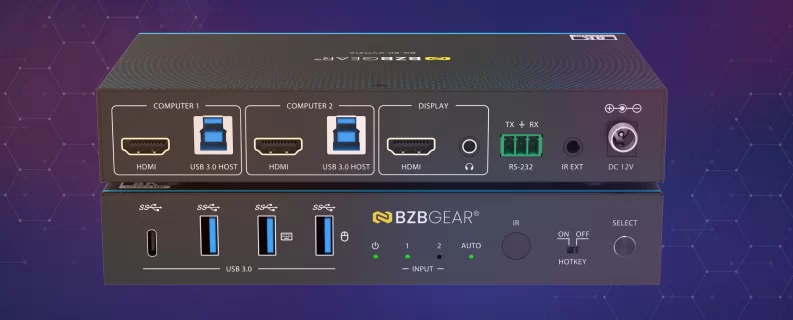
Switches like the BG-8K-KVM21A, BG-8K-KVM22A, and BG-8K-KVM41A — BZBGEAR's 8K HDMI 2.1 KVM line — pair HDMI 2.1 video switching with USB 3.0 peripheral switching, hotkey control, and IR control. You get the resolution headroom for tomorrow's displays and the USB headroom for everything you'd actually want to plug into a modern workstation.
Distance Is the Real Challenge
USB was originally designed for short, desktop-length cable runs. Five meters, give or take. That's a problem in any AV install where the source gear lives in a rack room and the user lives somewhere else — a podium, a stage, a control desk, an OR. Pushing native USB 3.0 across those distances takes purpose-built extension.
The good news is the toolkit has matured. Active optical USB cables like the BG-CAB-U3A carry USB 3.0 signals across long runs in a single, self-contained cable — no separate sender and receiver boxes, no extra power supplies to install. For multi-port setups — say, a remote workstation that needs four peripherals at the other end of a fiber run — a fiber extender like the BG-EXUF moves USB 2.0, 3.0, and 3.1 SuperSpeed traffic over a single fiber link with four USB 3.0 ports at the remote end, reaching up to 300m on fiber.
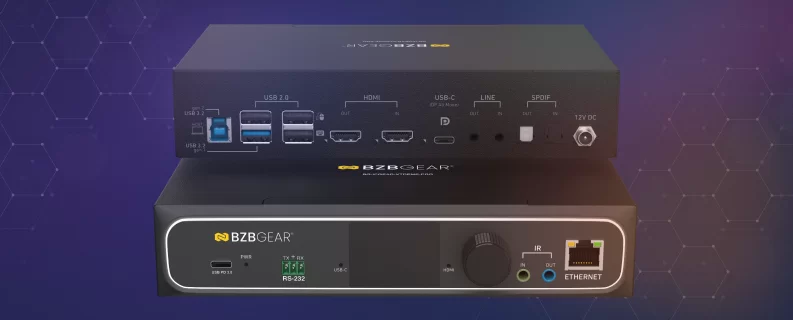
And for facilities going fully networked, AV-over-IP platforms are now expected to carry USB alongside video. The BG-IPGEAR-XTREME and BG-IPGEAR-XTREME-PRO multicast transceivers do exactly that — 4K and 8K video distribution with seamless matrix switching, KVM, and USB 3.0/3.1 routing on the same network. One infrastructure, one signal path, no separate USB plumbing to maintain.
Capture and Everything In Between
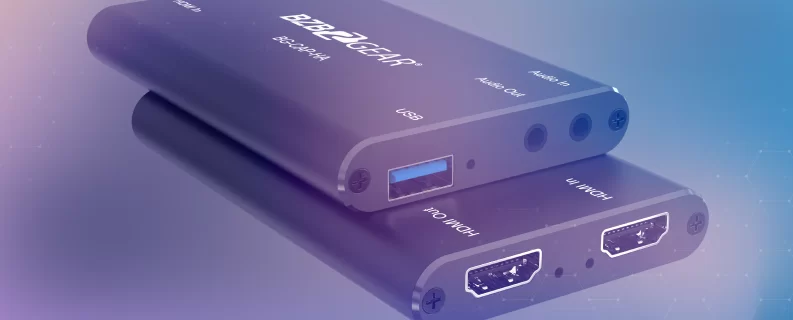
USB 3.0 isn't only about routing — it's about getting signal into and out of computers cleanly. The BG-CAP-HA is a USB 3.0 powered HDMI capture device that turns an HDMI source into a UVC device your computer recognizes natively, perfect for pulling a camera feed, a game console, or a hardware switcher into OBS, Teams, or an NDI workflow. It supports HDMI 2.0 input with HDR10 pass-through up to 4K@60Hz 4:4:4, and handles LPCM 7.1, Dolby Atmos, Dolby TrueHD, and DTS-HD Master Audio pass-through on the HDMI side.
It's a small thing, but it adds up. When every device in a workflow speaks USB 3.0, you stop building around limitations and start building around what you actually want the system to do.
Build Around the Bandwidth You'll Actually Use
USB 3.0 isn't flashy. It's not the headline spec on a datasheet. But it's the quiet layer that determines whether your 4K cameras hit their advertised resolution, whether your KVM feels instant, and whether your AV-over-IP install can carry the peripherals your operators actually use. If you want reliability, top-notch customer service, and gear that's ready for the bandwidth modern workflows demand, BZBGEAR offers a full lineup of USB 3.0 KVM switches, fiber extenders, AV-over-IP transceivers, and capture devices built for professional installations.
Looking for the right USB 3.0 piece for your next project, or trying to wrap your head around how it all fits together? Reach out — we're happy to help.


8.00 a.m. - 5.00 p.m. (PST)
10.00 a.m. - 3.00 p.m. (PST)
(by appointment only)


