







How USB-C, KVM, and Laptop Charging Are Transforming Conference Rooms
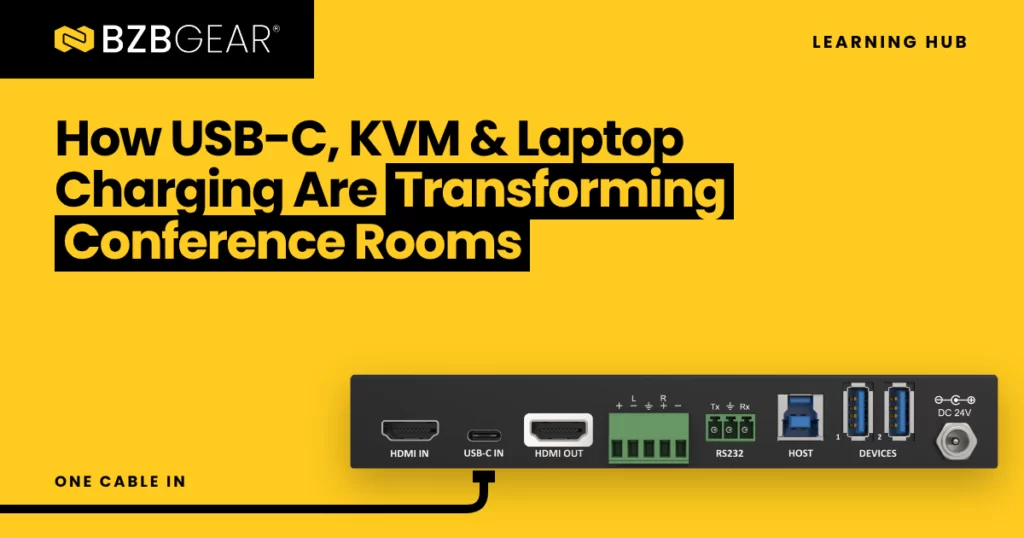
Most meetings don't start late because of the agenda. They start late because someone is under the table hunting for the right adapter while another person's laptop battery quietly slips into the red. If you've installed or supported a conference room, you've seen it more times than you can count.
The good news is that the fix has mostly shown up on its own. USB-C has become the go-to port on modern laptops, and that one small connector can carry the three things a presenter actually needs: their screen, their peripherals, and power. Pair it with KVM switching and the room starts working the way people expect it to.
Let's break it down.
One Cable, Three Jobs
USB-C is the physical connector, the small reversible plug. What makes it so useful in a conference room is everything that can travel through it:
- Video. DisplayPort Alternate Mode (DP Alt Mode) lets a USB-C port send a DisplayPort video signal straight to a display or switcher.
- Data. Standard USB data for keyboards, mice, cameras, and speakerphones.
- Power. USB Power Delivery (USB PD) lets the same cable charge the laptop while it's presenting.
Here's a helpful way to picture it. Inside a USB-C cable are four high-speed lanes, a bit like a four-lane highway. DP Alt Mode can borrow two lanes for video and leave the other two for fast USB 3 data, or take all four lanes for video and send USB 2.0 data over separate pins. That's why one USB-C input might be rated for 4K30 and another for 4K60. The spec sheet is really telling you how those lanes are being shared.
One quick caveat: not every USB-C port does video. Some laptops have USB-C ports that only charge or move data. Before you promise a client a one-cable experience, confirm the laptops that will use the room support DP Alt Mode or Thunderbolt video on that port.
Why KVM Belongs in the Conference Room
KVM stands for Keyboard, Video, Mouse. Traditionally, a KVM switch let one person control several computers from a single keyboard, monitor, and mouse, and it lived in server rooms and control rooms.
In a conference room, the "keyboard and mouse" part has grown up. Today it means the room camera, the speakerphone or ceiling mic, the touch display, and maybe a wireless keyboard. And that matters, because more meetings now run on whoever is presenting. A guest joins from their own laptop, on their own meeting platform, and still needs the room's camera and microphone.
That's exactly the problem a KVM presentation switcher solves. When you switch from the room PC to a guest laptop, the USB peripherals follow the video. The guest plugs in one USB-C cable, their screen appears on the display, and their meeting software sees the room camera and speakerphone. No swapping cables. No "can everyone hear me?" It's really that easy.
Charging: The Feature Nobody Notices Until It's Missing
For years, USB PD topped out at 100 watts (20 volts at 5 amps). In 2021, the USB Promoter Group released USB PD 3.1, which added an Extended Power Range of up to 240 watts for more power-hungry machines. One detail installers should know: any USB-C cable carrying more than 3 amps needs an electronic marker chip (an "e-marked" cable). If someone replaces the table cable with a cheap one from a drawer, charging can quietly drop.
The practical takeaway is to match the charging wattage to the laptops in the room. A lower-wattage port will keep many thin-and-light laptops topped up, but a heavier laptop running a video call and screen share can still drain slowly while plugged in. If the room hosts visitors with unknown laptops, more headroom is the safer choice.
Distance: Where USB-C Hits Its Limit
USB-C cables are short. A typical passive USB-C video run is rated around 5 meters, and full-speed USB 3 runs are shorter still. That's fine for a huddle room where the display hangs right next to the table. It's not fine for a boardroom with a display 40 feet away or equipment tucked into a closet.
That's where HDBaseT comes in. An HDBaseT extender carries video, USB, Ethernet, control, and even power over a single category cable, so the USB-C connection can live at the table while everything else lives wherever it needs to.
BZBGEAR Highlight: Matching the Gear to the Room
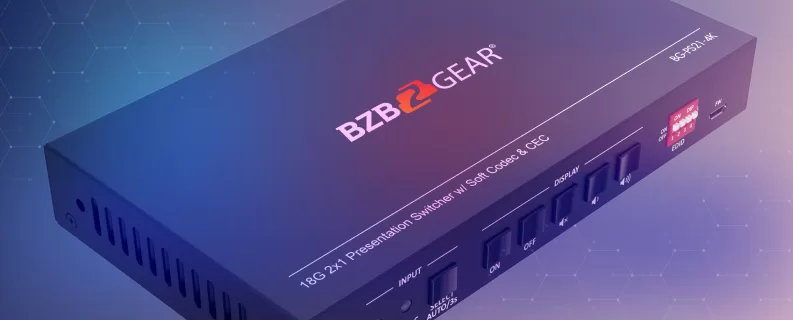
For small huddle rooms, the BG-PS21-4K is a straightforward place to start. It's a 2x1 KVM presentation switcher with one HDMI input and one USB-C input feeding a single HDMI display. The USB-C input carries 4K@30Hz video, USB 3.0 data, and up to 40 watts of charging, while the HDMI input handles 4K@60Hz 4:4:4 for a room PC. Its two USB 3.0 Type-A ports let both sources share peripherals like a webcam, speakerphone, keyboard, or mouse, and auto-switching selects the new source as soon as it detects a signal. Just keep in mind that 40 watts is a top-up for most laptops, not a full-speed charge for a power-hungry one.
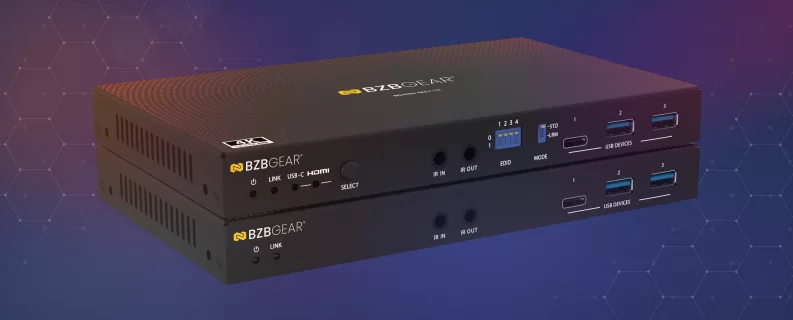
For larger rooms where the display is farther away, the BG-EXH-4KC7 puts a USB-C and HDMI input right at the table, with auto or push-button switching between them. Its USB-C port delivers up to 100 watts of charging, and the HDBaseT 3.0 link sends 4K@60Hz up to 328 feet (100m) over a single Cat6A/7 cable, or 1080p up to 492 feet (150m) in Long Reach Mode. The same cable also carries 1G Ethernet, RS-232, IR, and bidirectional 24V Power over Cable (PoC), so only one end needs a local power supply.
Two install details are worth knowing up front:
- Power the table end. The 100W charging only works when the power supply is connected to the transmitter, so plan the outlet at the table, not the display.
- Plan where your peripherals live. USB runs at USB 3.2 Gen 1 (5Gbps) on the transmitter side and USB 2.0 on the receiver side, and Long Reach Mode limits USB to basic devices like keyboards and mice. Put high-bandwidth peripherals at the table when you can.
A Quick Planning Checklist
Before you spec your next USB-C conference room, run through these:
- Do the laptops that will use the room support video over USB-C?
- How much charging wattage do those laptops need?
- Where will the camera, mic, and speakerphone live, and what USB speed do they need?
- How far is the table from the display or equipment rack?
- Do the room PC and guest laptops need to share the same camera and mic?
The Bottom Line
At the end of the day, people want to walk into a room, plug in one cable, and start their meeting. USB-C makes that possible, KVM makes the room's camera and mic follow whoever is presenting, and built-in charging means nobody is hunting for an outlet halfway through.
Whether you're outfitting a four-person huddle space or a full boardroom, BZBGEAR offers complimentary design services and engineering support to help you get it right. Explore the lineup at bzbgear.com or give our team a call at 1.888.499.9906. We'd love to help with your next room!


8.00 a.m. - 5.00 p.m. (PST)
10.00 a.m. - 3.00 p.m. (PST)
(by appointment only)