







4K120 vs. 8K60: Which HDMI 2.1 Resolution Is Better for Professional AV?

What each spec actually costs in bandwidth — and which one belongs in the system you're designing this year.
A question that comes up on nearly every spec call these days: the display vendor is pushing 8K, the client saw "8K" on a spec sheet somewhere, and somebody has to decide whether the whole system gets designed around it. Meanwhile, the source everyone actually plugs in is putting out 4K at 120Hz.
Both of those numbers live under the same HDMI 2.1 umbrella, which is exactly why the comparison gets confusing. They are not two settings on the same dial. They're two very different demands on the same pipe, and they fail in different ways when the pipe isn't big enough.
Let's break it down.
First, HDMI 2.1 Isn't a Performance Number
Here's the part that trips up more projects than any resolution debate: HDMI 2.1 is a specification umbrella, not a guarantee.
HDMI 2.1 replaced the old TMDS signaling method with Fixed Rate Link (FRL), and FRL runs in six discrete tiers. A device supports one of them. It can carry the HDMI 2.1 badge at 9Gbps or at 48Gbps — same sticker, 39 gigabits apart.
|
Tier |
Lanes × rate |
Bandwidth |
|---|---|---|
|
FRL1 |
3 × 3 Gbps |
9 Gbps |
|
FRL2 |
3 × 6 Gbps |
18 Gbps |
|
FRL3 |
4 × 6 Gbps |
24 Gbps |
|
FRL4 |
4 × 8 Gbps |
32 Gbps |
|
FRL5 |
4 × 10 Gbps |
40 Gbps |
|
FRL6 |
4 × 12 Gbps |
48 Gbps |
The features people associate with HDMI 2.1 — Variable Refresh Rate (VRR), Auto Low Latency Mode (ALLM), eARC, Dynamic HDR — are all optional under the spec. A device can be fully HDMI 2.1 compliant and support none of them.
So when you're comparing 4K120 to 8K60, the real question isn't which resolution is better. It's which FRL tier each one demands, and whether every device in your chain can actually deliver it.
Where the Bandwidth Actually Goes
Resolution is only one of four variables. Refresh rate, chroma subsampling, and color depth all multiply into the total, and that's where the surprises live.
- 4K60, 4:4:4, 8-bit — roughly 17.8 Gbps. That's FRL2 territory, which is why the 18Gbps generation of gear handled it comfortably.
- 4K120, 4:4:4, 8-bit — roughly 35.6 Gbps. Now you need FRL5.
- 4K120, 4:4:4, 10-bit HDR — roughly 44.6 Gbps. That's FRL6, or FRL5 with compression.
- 8K60, 4:4:4 — doesn't fit in 48Gbps at all. It needs FRL6 and compression.
Notice that doubling the refresh rate at 4K costs you more than doubling the resolution costs at 60Hz. Refresh rate and color depth are the expensive variables, and they're the ones nobody puts on the box.
This is also the honest explanation for a very common support call. An integrator builds a chain out of 18Gbps gear, plugs in a 4K120 source, and gets soft-looking text, a dropout on source change, or no lock at all. Nothing is broken. The source quietly negotiated down to 4:2:0 or dropped to 60Hz because 35.6 gigabits was never going to fit through an 18-gigabit pipe.
The Compression Everyone Forgets: DSC
Display Stream Compression (DSC) is the reason 8K over HDMI is possible at all. It's a visually lossless compression scheme defined by VESA that shrinks the stream enough to fit inside FRL6, and in practice it does its job well — you're not going to spot it in a room.
But DSC is a feature, not an assumption. Both ends have to support it, and so does everything in between. A chain where the source and the display both do DSC but the extender or matrix in the middle doesn't is a chain that won't pass 8K60, no matter what the display's box says.
Think of it like shipping a piece of furniture through a doorway. DSC is the flat-pack. If any doorway along the route only accepts fully assembled furniture, the flat-pack doesn't help you.
Content Is the Tiebreaker
Here's where we'll be straight with you, because the honest answer is more useful than the flattering one.
8K displays exist. 8K content essentially doesn't. There's no meaningful broadcast, streaming, or disc-based 8K library, and there won't be one in the life of most systems being commissioned right now. Any manufacturer telling you otherwise is going to get caught.
4K at 120Hz is the opposite situation. The sources are already here — game consoles, PCs, high-end media players, medical imaging, live production gear. The displays are shipping. The content is real. The chain in the middle is what's behind.
So if the question is genuinely "which one should this system be built to display today," the answer is 4K120, and it isn't close.
The Better Answer: Buy Bandwidth, Not Resolution
Here's the thing, though. Both specs are asking for the same top FRL tier. Full 4K120 with 4:4:4 chroma and 10-bit HDR wants FRL6. 8K60 wants FRL6 with DSC. Once you've specified a 48Gbps chain for the thing you need today, 8K readiness comes along for free.
That reframes the whole decision. Don't buy 8K for 8K. Buy 48 gigabits, because that's what full 4K120 actually costs — and then the 8K ceiling is simply there if a job ever needs it.
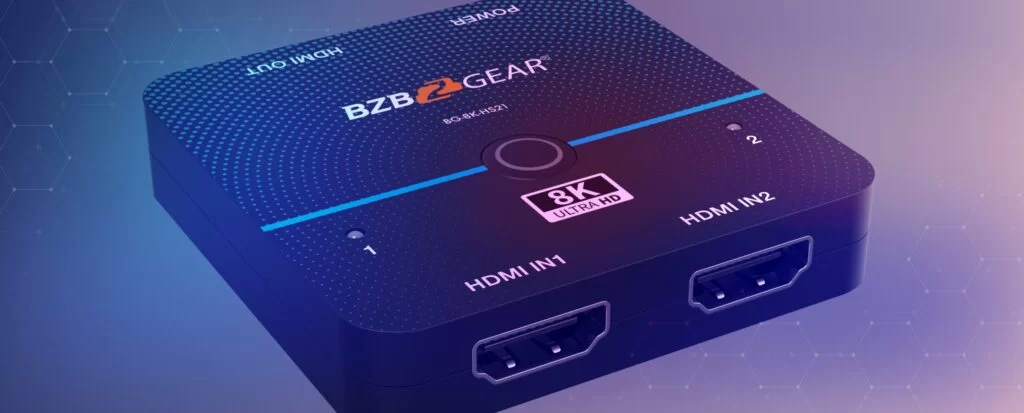
The other thing worth knowing is how little that ceiling costs to reach on the switching side. BZBGEAR's 8K switcher line starts with the BG-8K-HS21, a 2x1 HDMI 2.1 switcher that's HDCP 2.3 compliant, runs the full 48Gbps, and measures 2.4 inches square at about an ounce — small enough to tuck behind a display and powered over USB. The ladder runs up from there through 8K matrix switching and 8K KVM long before you're near enterprise money.
BZBGEAR Highlight: BG-IPGEAR-XTREME-PRO
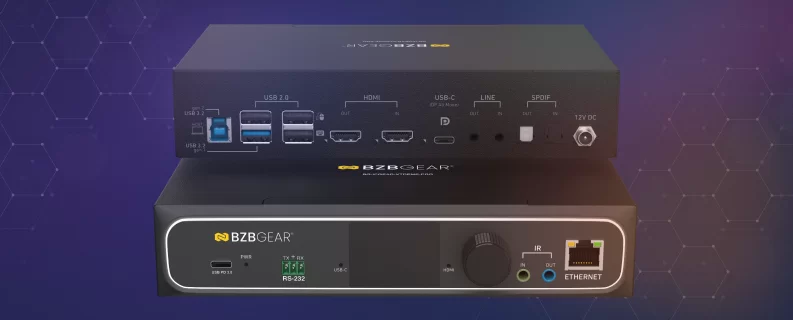
When the distribution layer is what has to carry the tier, the BG-IPGEAR-XTREME-PRO is the flagship of our XLink-ONE AV-over-IP platform, and it's built for exactly this ceiling. It handles 8K@30 4:4:4, 8K@60Hz 4:2:0 uncompressed, 8K@60Hz 4:2:2 with DSC, 4K@144Hz 4:4:4 and 4K@120Hz 4:4:4 — all across FRL6 (48Gbps) bandwidth, on a standard 1 Gigabit Ethernet network, at less than one frame of latency. Full-duplex operation is supported at 4K@120Hz 4:4:4.
It reaches up to 170m (560ft) over Cat.5e/6/6a/7 at those top modes, with EDID management, CEC and HDCP bypass, IGMP snooping and 802.1Q VLAN support built in. One note worth planning for: the published specification lists a 12V DC power supply, and a 12V adapter ships in the box — so budget an outlet at every PRO location rather than assuming the endpoint will take PoE.
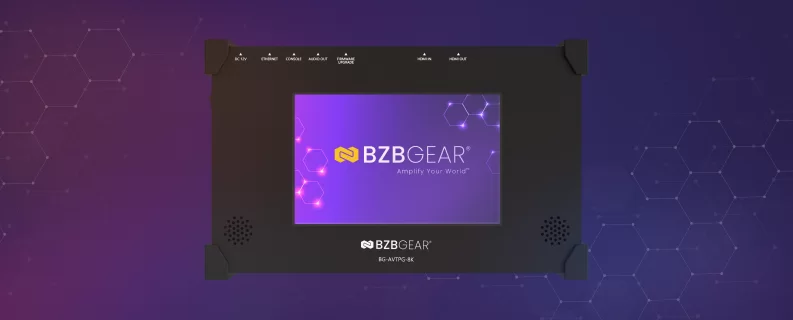
For commissioning, the BG-AVTPG-8K signal generator and analyzer earns its keep on the first troubleshooting call. It accommodates the full bandwidth of HDMI 2.1 with HDCP 2.2 across 1080p, 4K and 8K, runs on a rechargeable battery with a 7-inch touch panel, and includes a loop-through that passes the connected input to an external display or to its own screen — so when a display won't sync at 4:4:4 and everyone in the room is blaming the network, you can find out in about two minutes whether it's the source, the sink, the cable or the handshake.
The Bottom Line
4K120 is the spec with real content behind it. 8K60 is the headline. But they're both asking for the same 48-gigabit pipe, so building for one gets you the other.
Before your next order, ask a different question than "is it HDMI 2.1?" Ask what FRL tier every link supports — source, cable, extender, matrix, and the display's port mode, which ships defaulted to a lower setting more often than you'd think. The chain runs at its lowest tier, and the extender is usually the one nobody checked.
Working through a signal path and not sure where the ceiling really is? Reach out — we're happy to walk the tiers with you before it turns into a change order. And to see the full HDMI 2.1 and 8K lineup, visit bzbgear.com.


8.00 a.m. - 5.00 p.m. (PST)
10.00 a.m. - 3.00 p.m. (PST)
(by appointment only)