







How to Troubleshoot Long Range Matrix Kit Receiver Issues
Use the following steps when a receiver has no video or the video is intermittent/blinking.
1. Check Power and Connections
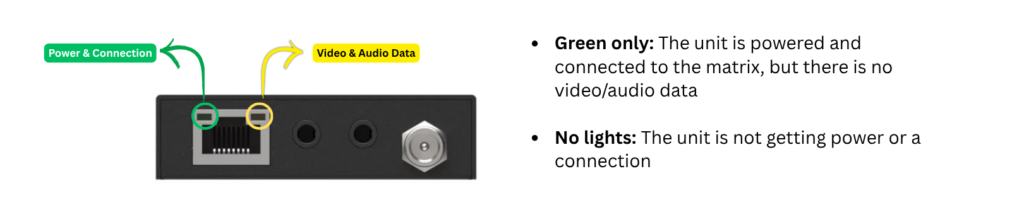
- Confirm the receiver is receiving PoC power. Check the receiver's power LED or Ethernet port indicator
- Reseat both the CAT and HDMI cables
- If possible, replace the CAT and HDMI cables with known good cables
2. Check the Web GUI
Verify that:
- The correct input is routed to the affected output
- The output is enabled and configured correctly
- Any applicable EDID, HDCP, scaling, or video settings are appropriate
If possible, compare the affected output with a working output.
3. Test With Known Good Components
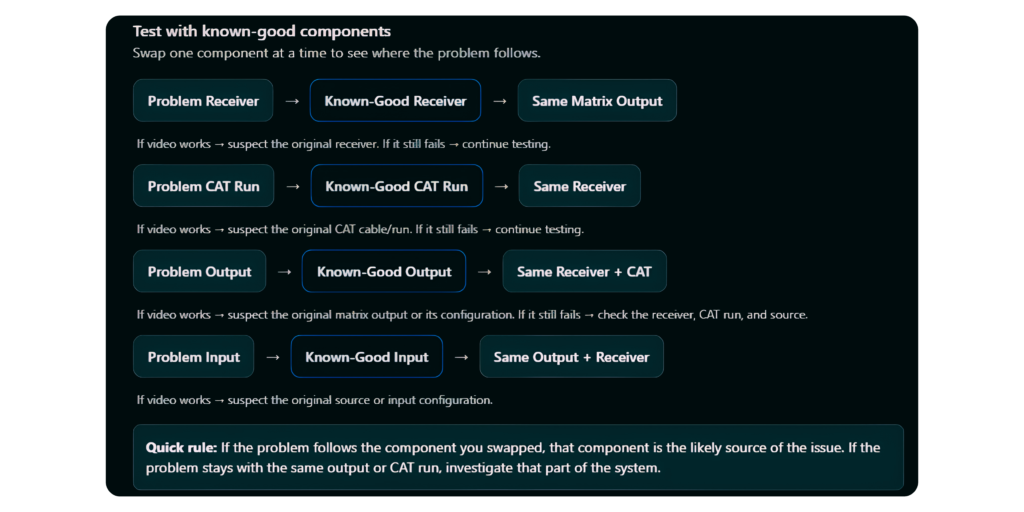
Swap components to determine where the problem follows:
- Known good receiver on the affected output: If it works, the original receiver may be defective
- Affected receiver on a known good output/CAT run: If it works, the original output or CAT run may be the issue
- Known good CAT cable/run: If the issue is resolved, the original CAT cable or run may be the cause
- Known good input source: Helps rule out the source or input port
4. Isolate the Problem
Use these results to identify the likely cause:
|
Problem Follows |
Likely Cause |
|
Receiver |
Receiver hardware |
|
CAT cable/run |
CAT cable or infrastructure |
|
Matrix output |
Output port or setting configuration |
|
Input/source |
Source or input configuration |
|
Multiple outputs/receivers |
Matrix configuration, firmware, power, or system wide issue |
If the issue remains after testing known good components, compare the affected output with a working output and, if appropriate for the model, perform a factory reset and retest.
When contacting BZBGEAR Support, provide the results of the swap tests. This will help determine whether the issue is related to the receiver, CAT run, matrix port, source, or configuration.


8.00 a.m. - 5.00 p.m. (PST)
10.00 a.m. - 3.00 p.m. (PST)
(by appointment only)
