





How to Configure and Troubleshoot PTZ Camera Presets
This guide explains how to save and recall camera presets and troubleshoot common preset issues. Presets allow you to save specific camera positions and zoom levels so you can quickly return to them when needed.
If you continue to experience issues after following these steps, contact support@bzbgear.com.
Setting Up Camera Presets
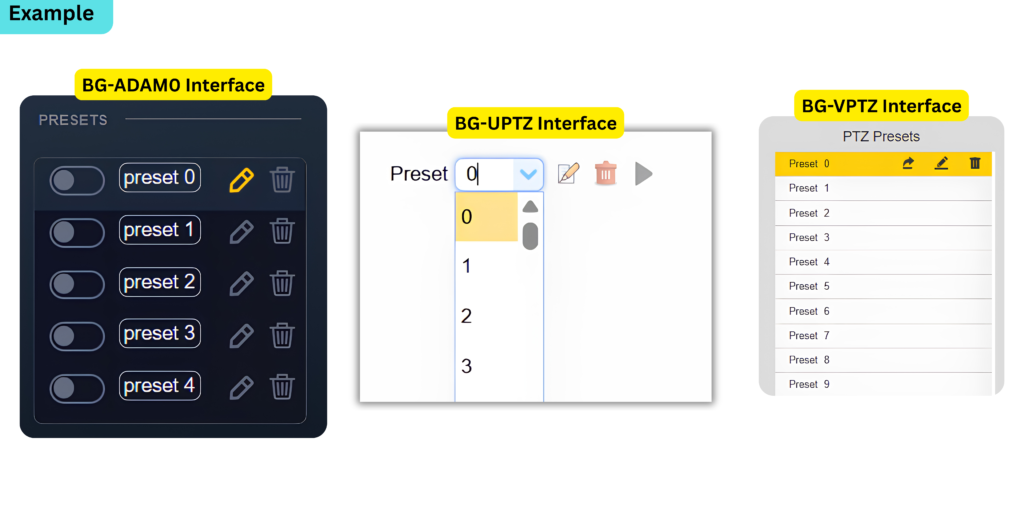
Camera presets are not preconfigured positions set by us here at BZBGEAR. They are saved camera angles and settings that you can create and recall as needed.
- Position the camera: Move the camera to the desired angle and adjust the zoom level. Verify that the image looks the way you want it to appear when the preset is recalled.
- Select a preset number: Choose an available preset number. Keep track of your saved presets to avoid accidentally overwriting an existing position.
- Save the preset: Use one of the following methods:
- Web GUI: Use the camera's preset controls to save the current position.
- BZBGEAR Pro PTZ Camera Control App: Use the preset controls to save the current position.
- Joystick controller: Press and hold the desired preset number button until the controller's LCD screen confirms that the preset has been saved.
- Recall the preset: Select the saved preset using the Web GUI, app, or joystick controller. On joystick controllers that support the press & hold method, briefly press the preset number button to recall it

Important: Preset controls and button functions may vary by camera model and controller. Refer to the appropriate product manual if the controls differ from these instructions.
Troubleshooting Preset Issues
Preset Does Not Save
- Confirm that you are following the correct procedure for saving presets. We recommend using the simplest method available. Some of our devices offer more than one method, some more intricate than others
- Try saving a different preset number to determine whether the issue affects a specific preset
- Restart the camera and, if applicable, the joystick controller. Test the preset again
- If the issue persists, test saving a preset through the camera's Web GUI to determine whether the issue is related to the camera or the external controller or app
Preset Saves but Does Not Recall Correctly
- Recall the preset again to confirm the issue is consistent
- Delete the affected preset and save it again rather than attempting to overwrite it
- Verify that the camera is positioned correctly before saving the preset, including the desired zoom level
- Restart the camera and test the preset again
- If you are using a joystick controller or the BZBGEAR Pro PTZ Camera Control App, test the same preset through the camera's Web GUI to help isolate the issue
Preset Issues Persist
If the problem continues after testing the steps above:
- Test with a different preset number
- Test through another available control method, such as the Web GUI instead of the joystick controller or app
- Record the camera model, firmware version, control method, and steps required to reproduce the issue
A factory reset may be considered as a last resort. Before resetting the camera or controller, back up or document any important settings and presets where possible. A reset may erase saved configurations. Follow the product specific instructions for performing a factory reset.
If the issue remains unresolved, contact support@bzbgear.com with your test results and device information.


8.00 a.m. - 5.00 p.m. (PST)
10.00 a.m. - 3.00 p.m. (PST)
(by appointment only)