







Changing the IP Address on the BG-COMMANDER-JR
The BG-COMMANDER-JR uses two separate IP addresses:
- Web IP – Used for accessing the Web GUI.
- UDP IP – Used for internal controller communication.
Both must be configured correctly to ensure proper operation.
Web GUI — Change the Web IP
Purpose: Configure the IP address used to access the device’s web interface.
Steps:
- Open a web browser and log in to the BG-COMMANDER-JR Web GUI.
- Navigate to System Settings → Network Settings.
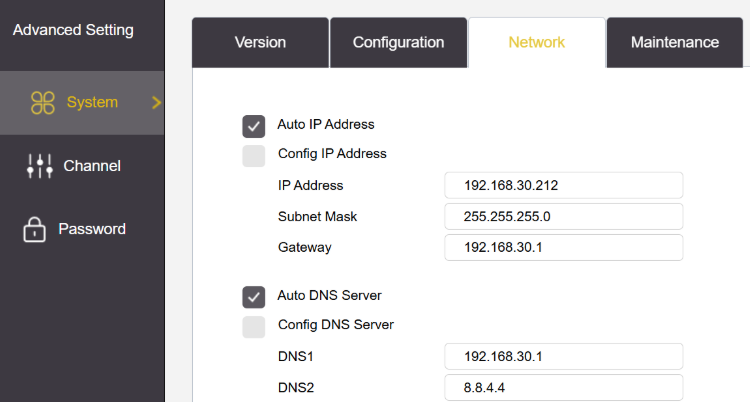
- Choose one of the following:
- Static IP – Manually enter the desired IP address, subnet mask, and gateway.
- DHCP – Enable DHCP to obtain an IP address automatically.
- Click Save.
- Reboot the device for the changes to take effect.
Controller OSD Menu — Change the UDP IP
Purpose: Configure the IP address used for internal controller communication.
Steps:
- Press and hold the Menu button on the joystick controller to open the OSD menu.
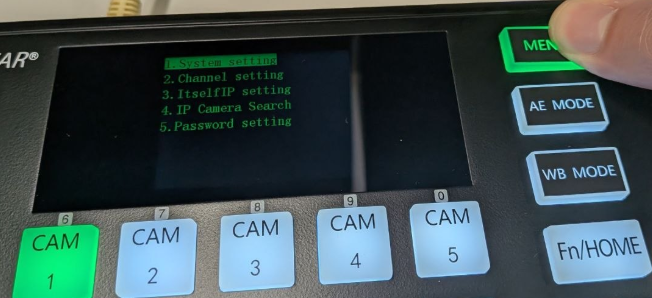
- Navigate to Itself IP Settings.
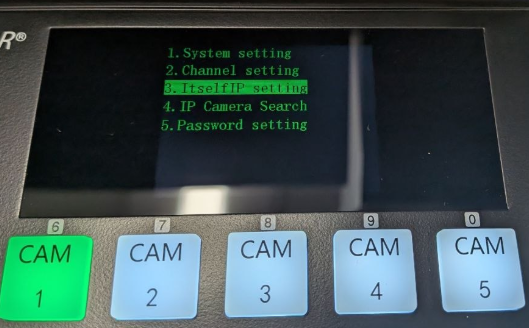
- Highlight the UDP IP field.
- Use the joystick to toggle to the fourth octet of the IP address.
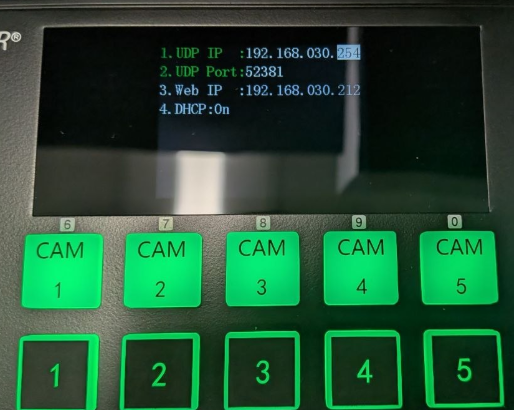
- Adjust the value as needed.
- Exit the Menu and power cycle


Get insider
updates & offers
Learn more
Get insider updates and offers
Join our vibrant community of BZBGEAR insiders today and unlock a world of exclusive updates, irresistible offers, and invaluable education.
Sales Inquiries
Leave your phone number, and one of our specialists will reach out to you shortly.
Call Us
Technical support
Monday - Friday
8.00 a.m. - 5.00 p.m. (PST)
8.00 a.m. - 5.00 p.m. (PST)
Saturday - Sunday
10.00 a.m. - 3.00 p.m. (PST)
(by appointment only)
10.00 a.m. - 3.00 p.m. (PST)
(by appointment only)
Phone & Email Support


