


BG-STREAM-E: RTSP Multicast Streaming Guide
Step 1: Access the Web GUI
- Connect the BG-STREAM-E to your network via Ethernet.
- Open a web browser and enter the device IP address.
- Log in with your credentials (default: admin / 0000).
Step 2: Enable Multicast
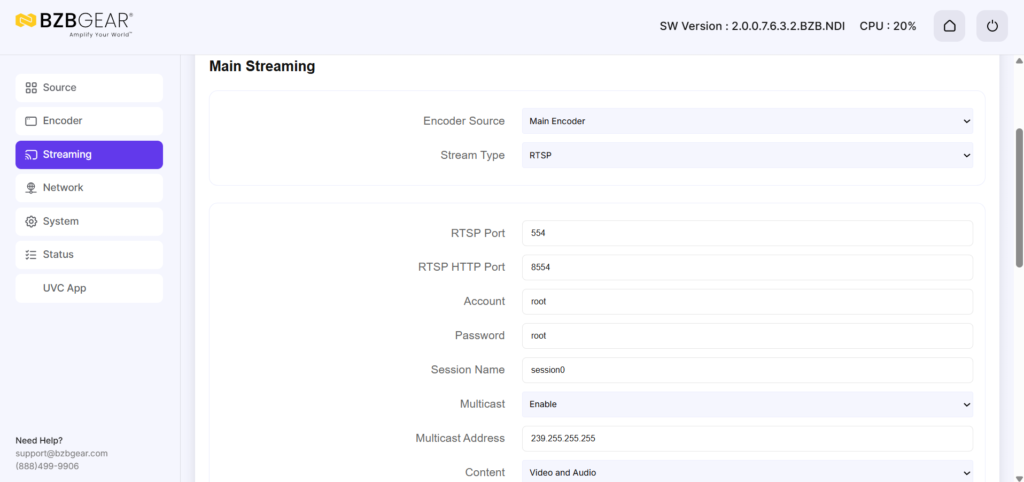
- Navigate to Stream Settings or Network Streaming.
- Enable Multicast.
- A new field will appear for the Multicast Address.
Multicast IP Address Guidelines:
- Must be in the range 224.0.0.0 to 239.255.255.255.
- Example: 239.255.0.1
- Configure the Port (default 554).
Step 3: Apply Settings and Start the Stream

- Fill in the Multicast IP, Port, and TTL.
- Click Apply to save the settings.
- Enable the stream using the Start / Enable Stream on the top right of the page.
Step 4: Test the Stream in VLC
- Open VLC Media Player → Media → Open Network Stream.
- Enter the multicast RTSP URL:
rtsp://<Multicast_IP>:<Port>/stream
Example:
rtsp://239.255.0.1:554/stream
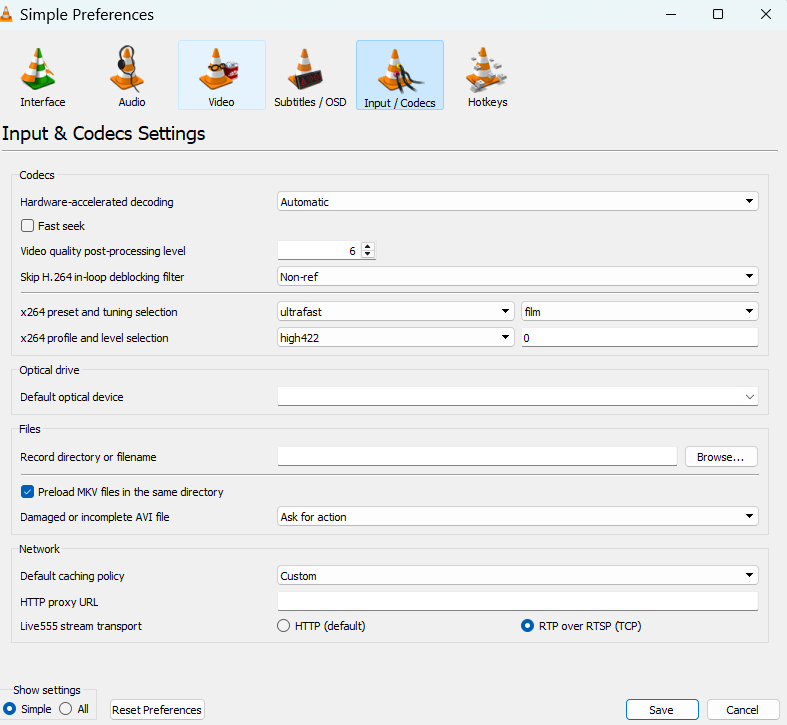
- Go to Tools → Preferences → Input / Codecs.
- Check “RTP over RTSP (TCP)” to ensure reliable playback.
- Click Play to view the stream.
Tips
- Ensure all client devices are on the same network subnet.
- For managed switches, enable IGMP Snooping to optimize multicast traffic.
- Multicast reduces network bandwidth since multiple clients share the same stream.


Get insider
updates & offers
Learn more
Get insider updates and offers
Join our vibrant community of BZBGEAR insiders today and unlock a world of exclusive updates, irresistible offers, and invaluable education.
Sales Inquiries
Leave your phone number, and one of our specialists will reach out to you shortly.
Call Us
Technical support
Monday - Friday
8.00 a.m. - 5.00 p.m. (PST)
8.00 a.m. - 5.00 p.m. (PST)
Saturday - Sunday
10.00 a.m. - 3.00 p.m. (PST)
(by appointment only)
10.00 a.m. - 3.00 p.m. (PST)
(by appointment only)
Phone & Email Support



