







BG-MC-SERIES Setup Guide
This quick guide will walk you through the basic setup of the BG-MC-SERIES, if you are having technical issues after setup, please reach out to support@bzbgear.com.
Before You Power On
Before applying power, verify that all hardware components are installed correctly.
- Install all required input and output cards
- Ensure each card is fully seated and securely fastened
- Connect AC power (use dual power supplies if the system is equipped)
Important: Do not install or remove cards while the system is powered on.
Connect Your Sources and Displays
Inputs
- Connect source devices such as PCs, media players, or cameras to the input cards
- For long-distance runs, use HDBaseT with Cat6 or Cat6a cabling
Outputs
- Connect displays, projectors, or LED processors to the output cards
- Match the output format to the display type (HDMI, HDBaseT, SDI, or Fiber)
Network Connection and Web GUI Access
Network Setup
- Connect a LAN cable to the Main Control Card
- From the front panel, navigate to:
MENU → Network → DHCP → ON
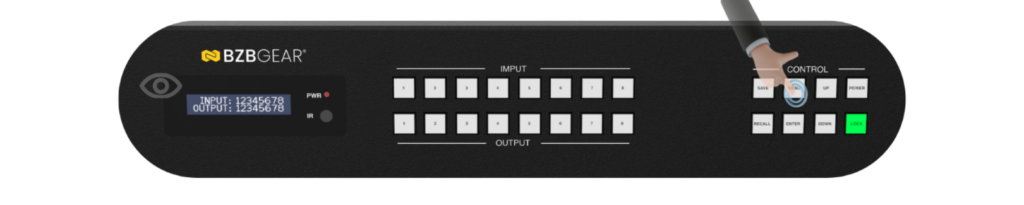
- Note the IP address shown on the LCD screen
Web GUI Login
- Enter the IP address into a web browser
- Log in using the default credentials:
- Username: admin
- Password: admin
- Rename inputs and outputs for easier system identification (recommended)
Video Wall Configuration
- Navigate to Splicing / Video Wall in the Web GUI
- Set the desired number of rows and columns
- Drag output channels into the layout
- Apply screen splicing
- Adjust bezel compensation and alignment as needed
- Save the configuration as a preset
Final System Checks
Verify that the system is operating correctly:
- All inputs are visible
- Outputs are scaled properly
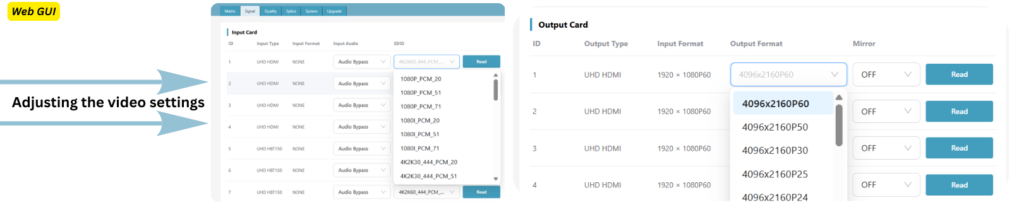
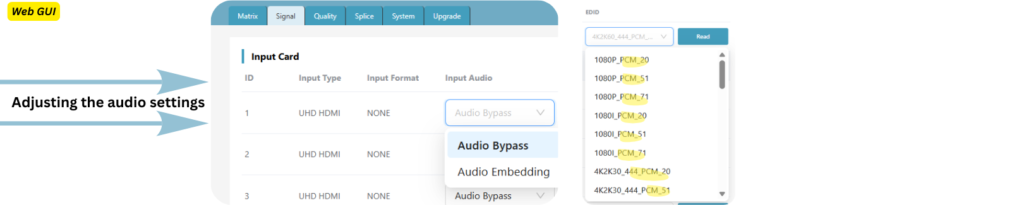
- Audio is present and correctly embedded or de-embedded
- Presets recall correctly
- Video wall alignment is accurate
Troubleshooting
No Video on Output
Check:
- Output card type matches the display
- Correct input is routed to the output
- HDCP compatibility (test using a non-protected source)
- Cable length and quality, especially for 4K60 HDMI
Fix:
- Manually set the output resolution
- Copy EDID from the display to the input
- Power-cycle the source and display
Video Flicker or Signal Dropouts
Likely Causes:
- Bandwidth mismatch (for example, 4K60 4:4:4 over low-quality cables)
- EDID conflicts
- Long HDMI runs without HDBaseT
Fix:
- Set EDID to 1080p first, then increase resolution incrementally
- Use HDBaseT for long-distance transmission
- Replace cables with certified high-speed cables
Audio Missing or Out of Sync
Check:
- Audio mode is set correctly (Embedding or De-Embedding)
- Display supports the selected audio format
- External audio processor latency
Fix:
- Force LPCM 2.0 for testing
- Match audio formats across all outputs
- Apply audio delay at the display or audio processor if needed
Cannot Access the Web GUI
Check:
- Matrix and PC are on the same network
- IP address matches the front panel display
- DHCP versus Static IP conflicts
Fix:
- Enable DHCP
- Set the PC to the same subnet
- Perform a factory reset as a last resort


Get insider
updates & offers
Learn more
Get insider updates and offers
Join our vibrant community of BZBGEAR insiders today and unlock a world of exclusive updates, irresistible offers, and invaluable education.
Sales Inquiries
Leave your phone number, and one of our specialists will reach out to you shortly.
Call Us
Technical support
Monday - Friday
8.00 a.m. - 5.00 p.m. (PST)
8.00 a.m. - 5.00 p.m. (PST)
Saturday - Sunday
10.00 a.m. - 3.00 p.m. (PST)
(by appointment only)
10.00 a.m. - 3.00 p.m. (PST)
(by appointment only)
Phone & Email Support


