


You’re most likely here because you are avoiding having to set up or purchase an entire AV receiver, and we totally understand. Fortunately, modern HDMI technology and audio extractors make it possible to extract audio from your TV without one. Below, we’ll explain how to extract audio from a TV. If you have any questions about our Audio Conversion solutions, feel free to reach out via phone, email, or chat!
Understanding Audio Extraction
You may have noticed that your TV has different HDMI ports, some labeled ARC or eARC. These technologies allow audio signals to travel from the TV back to an external audio device, such as a soundbar or audio processor.
Normally, a TV sends video to a display and audio to an AV receiver, which is typically larger and more sophisticated. However, if you don’t have a receiver, an HDMI audio extractor can intercept the audio signal directly from the HDMI connection and send it to a sound system. Audio extractors/converters are also typically more compact with fewer ports, buttons, and instructions.
How the Process Works
-
Receiving the Video and Audio Signal
Most if not every HDMI source, like a gaming console, Blu-ray player, or streaming device, sends both video and audio over the same cable. An audio extractor receives this combined signal and separates the audio from the video. -
Sending Audio to Your Sound System
After extracting the audio, the device outputs it to your sound system using an eARC or ARC connection, preserving high-quality formats like PCM, Dolby Atmos, or DTS:X. -
Passing Video to the TV
While the audio is routed to your sound system, the video continues to pass through to your TV. This means your TV displays the picture while your audio device handles the sound, all without additional complex equipment. -
Managing Audio Formats with EDID
Sometimes, TVs or soundbars may not automatically recognize the audio format. Many extractors, including the BG-8K-SA, use EDID settings to ensure that the correct audio format is transmitted. EDID helps devices communicate and agree on compatible audio types.
Using the BG-8K-SA as an Example
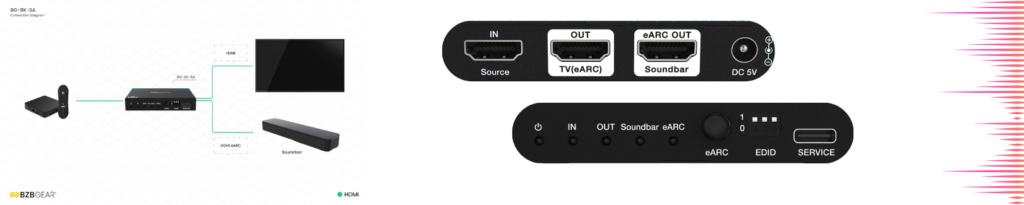
Here’s how the BG-8K-SA works in this scenario, as an example:
- It accepts HDMI input from any 8K60 HDMI 2.1 source.
- It separates the audio from the video and sends it to a soundbar via eARC.
- The video signal can still pass through to a TV without any loss.
- Its EDID management ensures that the audio format matches your TV's and sound system's capabilities.
Please feel free to reach out if you have any questions about our BG-8K-SA or any other solution.



