


How Does HDMI EDID Work?
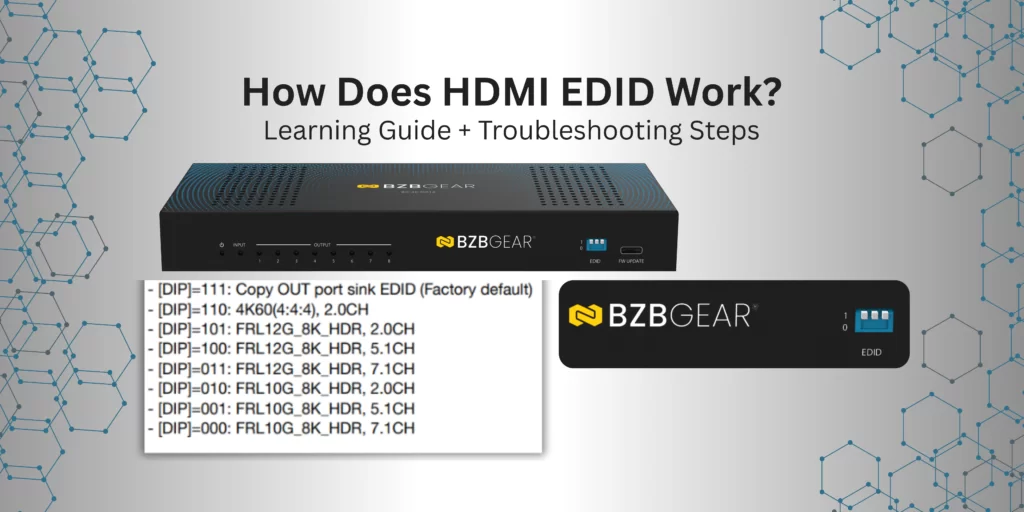
EDID stands for Extended Display Identification Data. It is a protocol that helps HDMI devices communicate more effectively by sharing information about the display’s capabilities. Instead of relying solely on automatic negotiation, EDID allows the source device to know exactly what video and audio formats the display supports. If EDID is an option, and there is a video or audio format issue, it is typically the first troubleshooting step recommended.
Key Information Contained in EDID
- Supported resolutions and refresh rates
- Color depth and formats (HDR, SDR)
- Audio capabilities (e.g., PCM, Dolby, DTS)
How HDMI Devices Use EDID
The process typically follows these steps:
- The source device detects a connected display.
- The source reads the display’s EDID data.
- The source configures its video and audio output to match the display’s capabilities.
Automatic vs. Manual EDID Handling:
- Automatic: Plug-and-play recognition by the source device.
- Manual: Using EDID emulators or custom EDID to ensure compatibility.
EDID can usually be configured in several ways:

- Physical dip switches on the device.
- Through a software interface on a PC.
- Via serial or IP commands.
- Some devices even offer limited EDID settings through their remote control.
Troubleshooting EDID Problems
Signs of an EDID mismatch:
- Blank screens
- Incorrect resolutions
- Audio issues
Best Practices When Using EDID:
- Always reboot and reconnect devices after changing EDID settings.
- If handshake issues exist, the new EDID configuration might not take effect immediately.
- Power cycle or reboot your devices after updating EDID.
- In some cases, reseating the HDMI connection can help ensure the devices go through the HDMI handshake process entirely.


Get insider
updates & offers
Learn more
Get insider updates and offers
Join our vibrant community of BZBGEAR insiders today and unlock a world of exclusive updates, irresistible offers, and invaluable education.
Sales Inquiries
Leave your phone number, and one of our specialists will reach out to you shortly.
Call Us
Technical support
Monday - Friday
8.00 a.m. - 5.00 p.m. (PST)
8.00 a.m. - 5.00 p.m. (PST)
Saturday - Sunday
10.00 a.m. - 3.00 p.m. (PST)
(by appointment only)
10.00 a.m. - 3.00 p.m. (PST)
(by appointment only)
Phone & Email Support



