


Splitter vs. Switcher: Understanding Signal Flow for Your Next Project
Inside the world of pro AV, managing your signals and figuring out what equipment you need is the difference between a seamless experience and a technical bottleneck. To that end, two of the best tools for the job in most cases are going to be splitters and switchers, and while they might sound or seem similar they couldn’t be more different in their use.
Whether you’re looking to design a corporate huddle room, an eSports arena or even a high end home theater making sure to choose the correct hardware for your use case is essential for maintaining a professional end result. Let’s break down the functional differences and how to choose the right BZBGEAR solution for your needs.
1. The HDMI Splitter: One Input, Many Outputs
A splitter is fairly simple to understand, it does exactly what it says on the box. It’s primary job first and foremost is to take a single video signal, like a DVD player, and split that signal into several identical signals that you can throw onto several displays.
- Signal Flow: One source to multiple displays.
- The Goal: Uniform content distribution. This means that every connected screen shows the exact same content at the exact same time.
- Ideal Applications: Retail digital signage, sports bars, or mirrored displays in a large lecture hall.
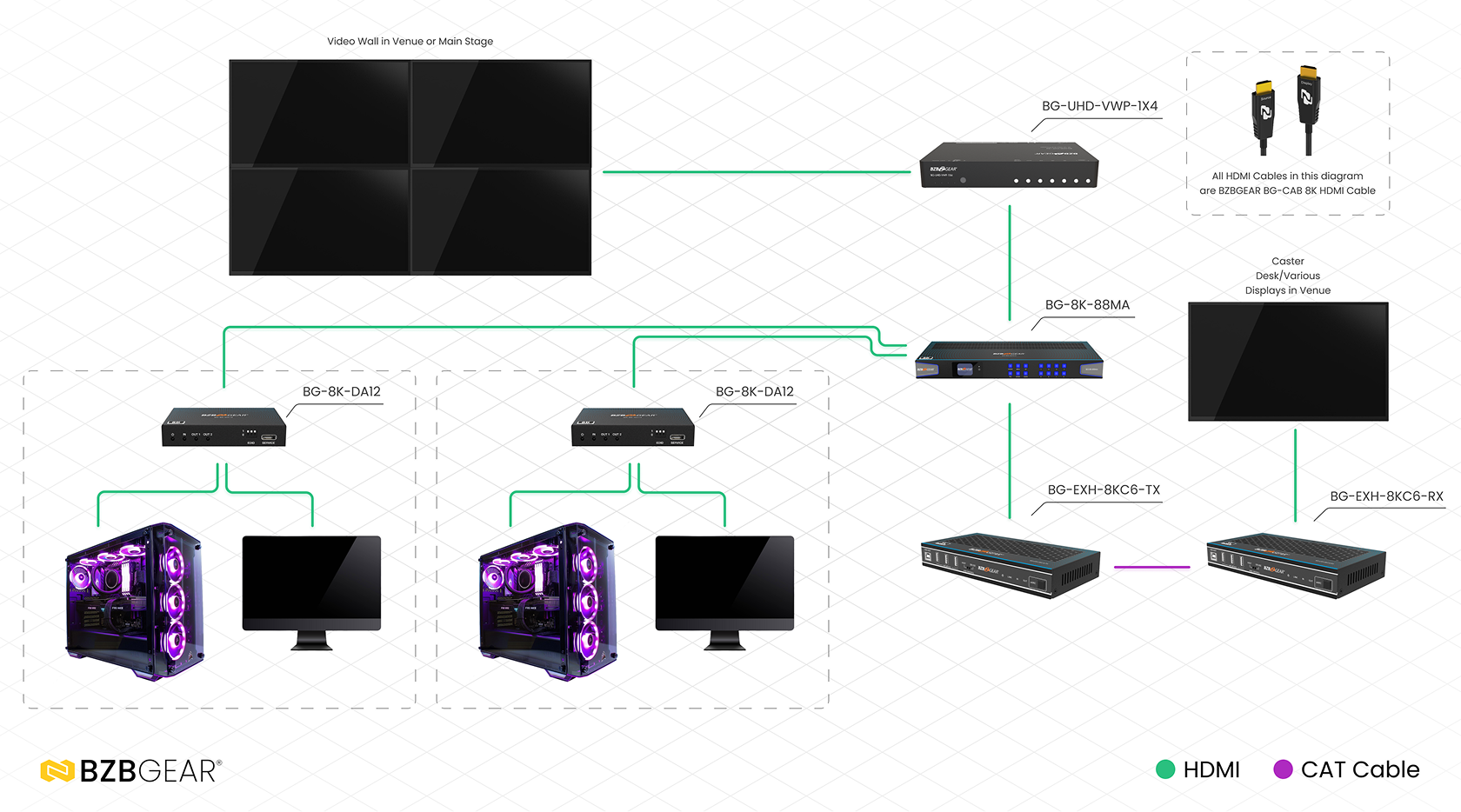
BZBGEAR Highlight: The BG-8K-DA12
In a modern eSports environment, a player needs their 8K@60Hz or 4K@120Hz signal sent to their primary monitor for zero-latency gameplay, however if the goal is also to entertain then they need to simultaneously send a feed to a shoutcaster or a recording station. The BG-8K-DA12 1x2 (one input and two outputs) HDMI splitter can handle this 48Gbps load effortlessly, meaning it can maintain full HDMI 2.1 specifications and doesn’t impact the gaming or viewing experience in a negative way.
2. The HDMI Switcher: Many Inputs, One Output
A switcher does the opposite of what a splitter does. Instead of taking one input and distributing it to several outputs, it instead allows for several inputs to be plugged into one display and gives the ability to switch between them freely. This becomes very important as it means you can eliminate the need to manually swap cables when wanting to move between different sources. It also means you can centralize all of your sources and create a much cleaner install.
- Signal Flow: Several sources to one display.
- The Goal: Consolidation is king. You get to choose which source is going up on the output screen and it allows for centralized installations of sources.
- Ideal Applications: Multi-presenter conference rooms, huddle spaces, and home entertainment hubs.
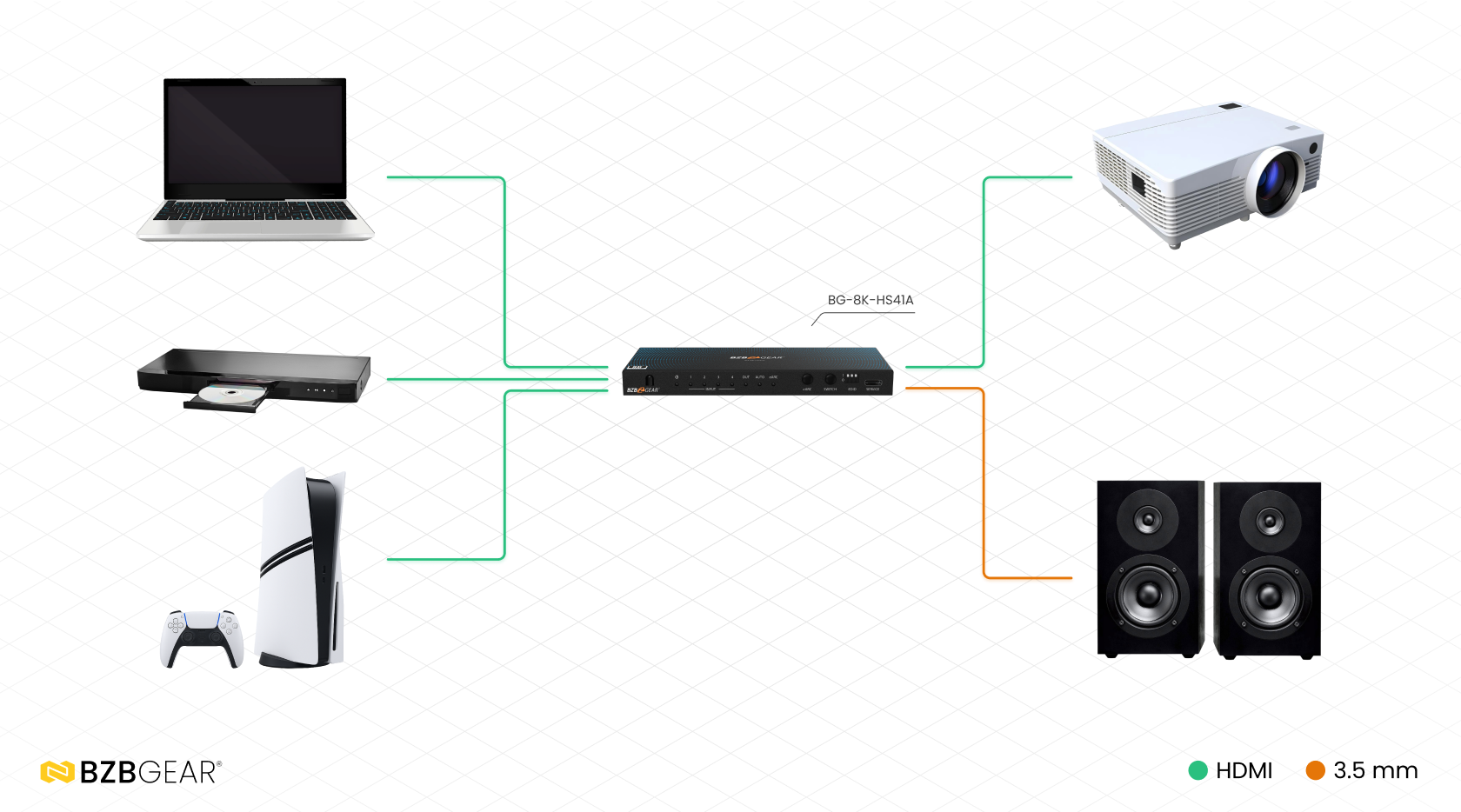
BZBGEAR Highlight: The BG-8K-41MT
For a small conference space where the goal is to allow multiple team members to share their screens on one main display or even have a small break and watch some content, the BG-8K-HS41A is the perfect fit. This 4x1 switcher allows for up to four different HDMI 2.1 inputs, which gives you the flexibility to swap between 8K (or lower!) sources with just a push of a button or even the included remote control.
How to Choose: Key Considerations
If you’re considering picking up some pro AV hardware, it’s important that you specify what your goals are. A simple way to help figure out what BZBGEAR solution you need can be boiled down by looking at these three factors:
A. Directionality of the Signal
The easiest way to figure out what you need is to look at what you have.
- Do I have one source that I want to send to several screens? If yes, then you need a Splitter.
- Do I want to be able to change between a couple of different devices on the same screen? If yes, then you need a Switcher.
- Note: If you have many sources that you want to go to many different screens independently, you require a Matrix Switcher.
B. Resolution and Downscaling Needs
Not choosing the right resolution for your displays and sources can be a common failure point for AV designs. For example if you have a 4K TV but only choose a 1080p splitter then you’re going to be degrading your viewing experience. The same goes for the source, it doesn’t do you any good to use a 4K switcher if the source you want to display is 8K!
- The BZBGEAR Advantage: Many of our splitters, for example the BG-8K-DA18, come with per-port downscaling. This means that the unit is able to send a native 8K signal to your primary display while also being able to downscale the signal to 1080p for secondary screens.
C. Control and Automation
Being able to have an easy time controlling your hardware is not only important but necessary. Having obtuse hardware that is frustrating to use is only going to hamper the experience. BZBGEAR switchers, depending on the model, usually will have RS-232, IR remote controls, front panel buttons and even a free app to manage and switch sources! Splitters however are generally a lot less complex, they’re very much set and forget boxes that will just deliver the signal automatically once the source is active.
Summary
No matter what you’re looking to do, if you follow the above guidelines for selecting your device, you’ll be creating success for yourself down the line because you’ll have picked the right hardware for the job. If you want reliability, top notch customer service, the latest trends and easy integration then BZBGEAR offers professional-grade HDMI switchers and splitters as well as matrix solutions that deliver top tier performance at every budget.
Ready to optimize your signal flow? Explore the full lineup of BZBGEAR 8K Splitters and 8K Switchers to find the perfect fit for your next high-bandwidth installation.


8.00 a.m. - 5.00 p.m. (PST)
10.00 a.m. - 3.00 p.m. (PST)
(by appointment only)



